Main Index : Tutorials :
This is an abstract coding overview meant to help people get started programming without prior experience. Be aware that all pieces of information within are programming concepts, not actual code. The C.O.F.F.E.E. Primer will cover how to apply this material in C.O.F.F.E.E. People reading the C.O.F.F.E.E. Primer will be assumed to have knowledge of these concepts.
Code is a list of instructions that a computer executes to do tasks from adding numbers together to rotating your favorite object. Computers are stupid, meaning they can't learn. A programmer must supply them with code to get them to do anything. The job of a programmer is to write these instructions to make the computer do new and useful things.
Variables are all about storage. They determine where things are stored in RAM. They act as named placeholders. Much like in mathematics, you have x = 5, which to the computer means store 5 into the slot called x. However, variables are not just limited to numbers, they can hold objects such as cubes, spheres, etc. They simply provide a way to find and retrieve a particular item.
Functions are named lists of commonly repeated instructions. For instance you might make a function to "Walk The Dog". Once you write the function, you can just say execute the "Walk The Dog" function. This execution is also called 'calling a function'. There are many advantages to this. You need not write the instructions of how to walk the dog every time you want to do so, just call the function "Walk The Dog" and the computer executes these instructions. Example "Walk The Dog" function:
Walk_The_Dog
{
	Find_Leash
	Find_Dog
	Attach_Leash
	Begin_Stroll
}
According to the concept code, every time you call the function: Walk_The_Dog Four instructions (or other functions) will execute. These instructions are: Find_Leash, Find_Dog, Attach_Leash, and Begin_Stroll Now you shall use the: Walk_The_Dog Function inside another function.
My_Day
{
	Wake_Up
	Take_Shower
	Eat_Breakfast
	Walk_The_Dog				//notice how you can call functions within other functions
	Goto_Work
	Eat_Lunch
	Return_Home
	Eat_Dinner
	Relax
	Goto_Bed
}
Functions are also useful because you can pass variables as parameters. Parameters are akin to ingredients of a recipe. Take the ingredients (parameters) and follow the instructions of the recipe (the function) to make a cake, or whatever the recipe was for. Parameters allow you to give information to functions. Functions also have what is called a return value. This is akin to the cake you get after you go through baking it. The return value is the end result of the function.
You can have a function like: Walk_The_Dog. What happens when there is more than one dog? What dog do you pick to go for a walk? By setting up the:Walk_The_Dog function to take a dog as a parameter. You allow the function to know what dog to take on a walk. So you might setup the new:Walk_The_Dog function like this:
Walk_The_Dog (dog) //the name you are giving to the passed parameter.
{
	Find_Leash				Find_Dog(dog) //dog specifies what dog to look for.
	Attach_Leash(dog)//dog specifies what dog to tie the leash to.
	Begin_Stroll
}
The dog parameter in this case is how the Walk_The_Dog
function is going to refer to the parameter you passed to this
function. It is possible for you to pass as many parameters as you
wish, just seperate the parameters with commas. It might look something
like this. Attach_Leash (dog, leash). Dog denotes what
dog to attach to, and leash tells you what leash to attach to the dog.
It is possible to pass many parameters, but please, don't go parameter
crazy.
Now for an example to tie it all together
variable Spot
variable Spots_Leash
variable Rover
variable Rovers_Leash

Walk_The_Dog(dog, leash)
{
	Find_Leash(leash)			//go find the leash
	Find_Dog(dog)             		//go find the dog
	Attach_Leash(dog, leash)		//go attach 'leash' to 'dog'
	Begin_Stroll				//let's go on a stroll
}

My_Day
{
	Wake_Up
	Take_Shower
	Eat_Breakfast
	Walk_The_Dog(Spot, Spots_Leash)		//take spot on a walk using his leash
	Walk_The_Dog(Rover, Rovers_Leash)   	//take rover on a walk using his leash
	Goto_Work
	Eat_Lunch
	Return_Home
	Eat_Dinner
	Relax
	Goto_Bed
}
Conditional execution allows certain code to be executed and other code to be skipped based on a certain condition.
code_line1
code_line2
if (condition)
{
	do_this
}
code_line 3
A more specific example:
Wake_Up
if (dirty)
{
	Take_Shower
}
Eat_Breakfast
Walk_The_Dog(Spot, Spots_Leash)
As you can see, if you are not dirty you don't take a shower. You only take a shower if you are dirty. And of course you always Wake_Up, Eat_Breakfast, & Walk_The_Dog. Now lets say you want to do something in place of taking a shower, for example, read a magazine.
General syntax:
code_line1
code_line2
if (condition)
{
	do_this
}
else
{
	do_that
}
code_line3
Example:
Wake_Up
if (dirty)
{
	Take_Shower
}
else
{
	Read_Magazine
}
Eat_BreakFast
Walk_The_Dog
First you would wake up, and then check if you where dirty. If so you would take a shower, otherwise you would read a book. Then you would eat breakfast, and then walk the dog. Notice how if you are dirty you take a shower and you DO NOT read a magazine. If you are NOT dirty, you read a magazine, and DO NOT take a shower. And yet another example, but this time you are using Timmy and Lassie:
if (timmy_fell_down_the_well)
{
	lassie_rescues_timmy
}
else
{
	lassie_barks
}
The last kind of conditional compulation is of this form:
if (condtion1)
{
	do_this1
}
else if (condtion2)
{  						//if previous condition is FALSE and condition2
	do_this2               			//is TRUE do_this2 and only this2
}
else if (condition3) //if previous conditions are FALSE and condition3 is TRUE
{
	do_this3
}
else
{                  			//do_this3 and only this3
	do_this4                 		//if all previous conditions are FALSE
}		               			//do_this4
Using previous example (3 up from here) and elaborating on it:
Wake_Up
if (dirty)
{
	Take_Shower
}
else if (magazine_is_boring)
{
	Watch_TV
}
else
{
	Read_Magazine
}
Eat_Breakfast
Walk_The_Dog
You wake up and check if you are dirty. If so take a shower, then eat breakfast, and the walk the dog. If you are clean and the magazine is boring you watch tv, then eat breakfast, and then walk the dog. If you are clean and the magazine is not boring, you read the magazine, then eat breakfast, and then walk the dog.
while (condition)
{
	do_this
}
While the condition is TRUE do_this.
do
{
	do_this
} while (condition)
Do_this and then check if condition is TRUE, if so loop.
Classes provide a way to group similar or related functions and variables into functional groups. For example you shall use a cup. Now let's brainstorm a little bit about a cup, think about the attributes of a cup:
There are countless other things you could probably think of but these are enough for this excercise. Looking at the qualities of a cup you realize that these would be perfect to use a class for. This is because they are all related to a cup. Also since attributes of a cup are not actions, they can't be functions. So they have to be variables.
class cup {
	variable CupColor         		//the cup's color
	variable HasLiquid        		//is the cup holding liquid
	variable AmountInCup      		//amount of stuff in cup
	variable HasHandle        		//does the cup have a handle
	variable IsUpright        		//is the cup upright
}
All of the variables that belong to the cup class contain the five attributes you described about the cup. You might say that the:
	CupColor = "red",
	HasLiquid = "yes",
	AmountInCup = 5 (oz),
	HasHandle = "yes",
	IsUpright = "yes".
This is all good, but what if you want to drink what is inside the cup, or you want to fill the cup with some liquid? For that you need to give the class some functions to preform actions on its variables.
class cup {
	variable CupColor
	variable HasLiquid
	variable AmountInCup
	variable HasHandle
	variable IsUpright

	function Drink               		//drink contents of cup
	function Pour_Into_Cup       		//fill up the cup with a liquid
	function Give_Handle         		//give the cup a handle
	function Remove_Handle       		//remove a cup's handle
	function Handle_State        		//tells you if the cup has a handle or not
	function Upright_State       		//tell you if the cup is upright or not
	function Content_Levels      		//tells the level(amount) of stuff in
the cup
}
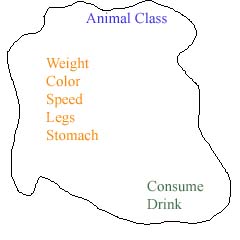
The final concept covered in this tutorial is the concept of deriving a new class off of a class that already exists. Deriving a class takes a predefined class, and allows you to create a class that is based off of the predefined one. This lets you use predefined classes to base new ones off of. Typically this new class is a more specific version of the class you base it off of. Say for instance you had an animal class, to help make the bird class or a wolf class, you derive them both from the animal class.
class animal
{
	variable Weight				//animal weight
	variable Color             		//animal color
	variable Speed				//how fast the animal moves
	variable Legs				//Number of legs animal has
	variable Stomach			//holds solids/liquids
	function Consume			//Makes the animal consume something
	function Drink				//Drink something
}
Derived Classes bird and wolf:
class bird : (derived off) animal
{
	variable WingSpan
	variable RangeOfSite

	function Fly
	function Look
	function Claw
	function Hunt
}

class wolf : animal
{
	variable RangeOfSite
	variable RangeOfSmell
	variable RangeOfHearing

	function Run
	function Walk
	function Smell
	function Look
	function Listen
}
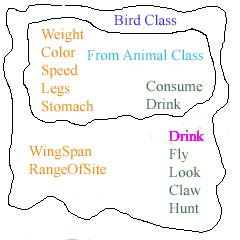
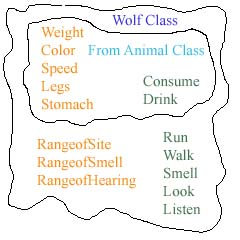
A more accurate representation (showing all derived variables and functions) of what both bird and wolf classes look like are shown below:
|
|
class bird : animal
{
,-----(Variables Inherited by animal class)---------
|		variable Weight
|		variable Color
|		variable Speed
|		variable Legs
|		variable Stomach
.___________________________________________________
	variable WingSpan
	variable RangeOfSite

,-----(Functions Inherited by animal class)---------
|		function Consume
|		function Drink
.___________________________________________________
	function Fly
	function Look
	function Claw
	function Hunt
}

class wolf : animal
{
,-----(Variables Inherited by animal class)---------
|		variable Weight
|		variable Color
|		variable Speed
|		variable Legs
|		variable Stomach
.___________________________________________________
	variable RangeOfSite
	variable RangeOfSmell
	variable RangeOfHearing

,-----(Functions Inherited by animal class)---------
|		function Consume
|		function Drink
.___________________________________________________
	function Run
	function Walk
	function Smell
	function Look
	function Listen
}
Notice how both the bird and wolf class have both variables and functions from the animal class, this is what deriving is all about. The last useful thing about deriving is that you can 'override' an inherited function. This is called function overloading. Let's say for your bird class the drink function (which it gets from the animal class and is defined by the animal class) isn't the way you need it for the bird class. You can do this:
class bird : animal
{
	variable WingSpan
	variable RangeOfSite

	function Drink				//Overriding Drink function from animal class
	function Fly
	function Look
	function Claw
	function Hunt
}
The next step is to read the C.O.F.F.E.E. Primer.