Main Index : Tutorials :
C.O.F.F.E.E. is a programming language in which plugins and expressions for CINEMA 4D are written. This programming language resembles C/C++ and Java. Some things work the same and some do not. For all of the C/C++/Java programmers out there, don't think it is the same thing. C.O.F.F.E.E. allows you to modify many things in CINEMA that you wouldn't otherwise be able to touch.
A feature that might be unnerving for any C programmer is the fact that C.O.F.F.E.E. is typeless. Meaning that any variables you declare have no type. All that you must do is declare the fact that you do indeed have a variable by using var. i.e.
var number = 5;
var name = "Bob";

var object;
Typeless is kind of a misnomer, a better word would be typefull. Variables in CINEMA can hold any type of data. A variable could hold a number at first and then you could assign it to contain a string. This versatility also has some pitfalls, but these are beyond the scope of this introduction. Although you will go through them when you get to them later in the Calculator Tutorial.
Even
though a variable can hold any kind of value (a number, a cube, or a
matrix), you can still figure out what it is holding at this moment. Thetypeof() function allows us to find this information out. typeof()
figures this out by looking at what is contained in the variable. Once
it has identified what the type is, it tells you by it's return value.
Remarks are text that are not read by the compiler. They are ignored. You can remark all text after the symbol // on a line. For example:
//This is a remark
var a = 4;     	    //set a equal to four
var b = c + a / 4;  //this might be the right algorithm
These are generally programmer notes. They can be other things as well, but the important thing to realize is that they are ignored by the compiler.
Functions in C.O.F.F.E.E. are prototyped as such:
function(parm1, parm2, parm3);
function(x, y, z);
function(cube);
function(rock, scale);
walk_the_dog(dog, leash);
What is a prototype you ask? Well it is a declaration of what a function is going to look like so C.O.F.F.E.E. knows how to use the function even before you actually define the function's contents. This allows you to use a function that is defined later on in the code. For example:
----- Function Example 1 -------
 01:	main()
 02:	{
 03:            var shape_cube;
 04:		RotateShape(shape_cube);
 05:	}
 06:
 07:	RotateShape(op)
 08:	{
 09:         //rotate code goes here
 10:	}
------- End Example ---------------
C.O.F.F.E.E. will try to compile this example from the top line to the bottom line (line 1 to 10). main()
is expected and needs to be in all code. C.O.F.F.E.E. will begin
execution here. Line 3 denotes that yes, there is a variable called
cube. Line 4 says call the function: RotateShape() passing the parameter: shape_cube
But there is a problem; no RotateShape function has been defined yet.
Remember C.O.F.F.E.E. goes from top to bottom it doesn't know about
things until it gets to that line. So even though the RotateShape()
function is right below it, alas, C.O.F.F.E.E. can't see it. So what is
the solution to this problem? An easy way around this is to write the RotateShape() function before the main function as so:
 1:	RotateShape(op)
 2:	{
 3:	        //rotate code goes here
 4:	}
 5:
 6:	main()
 7:	{
 8:		var shape_cube;
 9:		RotateShape(shape_cube);
10:	}
Now it knows what the RotateShape() function is and more importantly how to call it. This is acceptable but causes some problems. Also, it is less flexible.
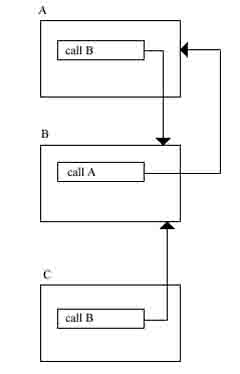
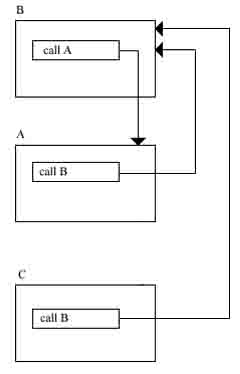
The problem is as such: Have a function B, that calls function A, below function A. But what happens when A calls B, and B calls A? As confusing as that sounds it's really simple to understand. Here is a picture to help you grasp what is going on. This picture shows the situation of the question. As you can see A can't call B because B hasn't been defined yet. One might think to fix this to put B above A. But as the next image shows you have the same kind of problem just reversed.
The problem is now B can't call A because A hasn't been defined yet.
If there are a whole bunch of functions this could get very confusing, or even impossible for you to write. The solution to this is to prototype your functions as shown in the beginning of the section or as follows:
 1:	RotateShape(op);//function prototype.
 2:
 3:	main()
 4:	{
 5:		var shape_cube;
 6:		RotateShape(shape_cube);
 7:	}
 8:
 9:	RotateShape(op) {
10:		//rotate code goes here
11:	}
This works because the main() function only needs to know how to call the RotateShape() function on line 6. It doesn't need to know what to do, that is up to the function. The actual definition of the RotateShape() function is on line 9. This is the definition of what that function does.
All functions and variable rules apply equally, when they are members of classes.
Symbol Chart (for logical operators):
== equals to
!= not equal to
<= less than or equal to
>= greater than or equal to
< less than
> greater than
1 == 1 is TRUE
1 != 1 is FALSE
1 <= 1 is TRUE
1 >= 1 is TRUE
1 > 1 is FALSE
1 < 1 is FALSE
Conditional expressions are used in conditional execution, which happens to be the next section.
Conditional execution allows certain code to be executed and other code to be skipped based on a certain condition.
------ Syntax 1 -------
code_line1;       //always do this
code_line2;       //always do this
if (condition) 	  //if condition is TRUE

{
	do_this;  //do_this
}
code_line3;       //always do this
------ Syntax 1 -------
Another syntax:
------ Syntax 2 -------
code_line1;       //always do this
code_line2; 	  //always do this
if (condition) 	  //if condition is TRUE
{
	do_this;  //do_this
}
else 	          //if condition is FALSE
{
	do_that;  //do that
}
code_line3;       //always do this
------ Syntax 2 -------
And yet another syntax:
------ Syntax 3 -------
if (condtion1)
{
	do_this1;
}
else if (condtion2)  //if previous condition is FALSE and condition2 is TRUE
{
        do_this2;    //do_this2 and only this2
}
else if (condition3) //if previous conditions are FALSE and condition3 is TRUE
{
        do_this3;    //do_this3 and only this3
}

else                 //if all previous conditions are FALSE
{
        do_this4;    //do_this4
}
------ Syntax 3 -------
For an elaboration check out the Coding Primer on conditional execution.
------- Switch Syntax ------
switch (variable)
{
	case 0:
		variable_is_0;
	case 1:
		variable_is_1;
	case 2:
		variable_is_2;
	case 3:
		variable_is_3;
	.
	.
	.
	default:
		variable_is_something_else;
		break;
}
------- Switch Syntax ------
This simply checks the value of the variable and in the case it matches it will execute. Be warned, it will execute all other cases below the executed case, that is if you don't break from it first.
------- Switch Syntax w/break ------
switch (variable)
{
	case 0:
		variable_is_0;
		break;
	case 1:
		variable_is_1;
		break;
	case 2:
		variable_is_2;
		break;
	case 3:
		variable_is_3
		break;
	.
	.
	.
	default:
		variable_is_something_else;
		break;
}
------- Switch Syntax w/break ------
Another observation is that switch statements can replace some [if]-[else if]-[else] constructs. Compare previous example with this:
------ If-Else as Switch -------
if (variable == 0)
{
	variable_is_0;
}
else if (variable == 1)
{
	variable_is_1;
}
else if (variable == 2)
{
	variable_is_2;
}
else if (variable == 3)
{
	variable_is_3;
}
else
{
	variable_is_something_else;
}
------ If-Else as Switch -------
They are logically the same, and probably compile almost identically.
while (condition)
{
	do_this;
}
While the condition is TRUE do_this.
do
{
	do_this;
} while (condition)
Do_this and then check if condition is TRUE, if so loop.
for (initialization; conditional; post-body-execution)
{
	do_this1;
	do_this2;
	do_this3;
}
This can be re-written like this for more clarity:
initialization;
while (conditional)
{
	do_this1;
	do_this2;
	do_this3;

	post-body-execution;
}
for (i=0; i<10; i++)
{
println(i);
}This would print out the numbers 0 to 9.
Within a loop you may need more control, there are two keywords that help us here. They are continue and break. Continue causes execution of the body to skip to the conditional statement of the loop. Break completely terminates the loop. Also break applies to switch statements. In this case it terminates execution of the switch statement, it brings execution right to the code after the switch block.
Simply use return to return control back to it's calling function. Alternatively you can have a variable after it or even a number. Return examples:
return;         //return to calling function
return 0;       //return to calling function passing back 0
return a;       //return to calling function passing back a
return a+b;     //return to calling function passing back a+b
Classes in C.O.F.F.E.E. act pretty much the same way explained in the Coding Primer Tutorial. The only thing left is to link ideas learned here to the class ideas learned in the previous tutorial. Here is an example class:
---------- Class Example 1 ------------
 1:	class ExampleClass
 2:	{
 3:	public:
 4:		var x, y, z;
 5:		var shape, matrix
 6:
 7:		RotateShape(shape, vector);
 8:		ScaleShape(shape, vector);
 9:		MoveShape(shape, vector);
10:	}
---------- Class Example 1 ------------
The
first thing the compiler sees is line 1, this denotes a class
definition. Line 3 denotes that the proceeding list is public. Public
is the access specifier. In other words it tells the compiler what kind
of access rights the following variables or functions have. Public
means anything, even functions outside of the class can access these
members. Line 4 declares three variables: x, y and z. Line 5 declares
two variables: shape and matrix. Line 6 is blank. Line 7 is a function
prototype for the RotateShape() function, accepting two parameters: shape and vector. Line 8 is a function prototype for the ScaleShape() function, accepting two parameters: shape and vector. Line 9 is a function prototype for the MoveShape()
function, accepting two parameters: shape and vector. What must be
understood is that both variables and functions are bound to the class.
Public: Gives access to members by functions both inside of the class and outside of the class.
Protected: Gives access to members within that class, and derived classes.
Private: Gives access to members only by functions within the class.
C.O.F.F.E.E.
allows you to define functions within a class (to allow you to have the
same function names within different classes). This is done with the
scope operator ::. Here is an example: ExampleClass::RotateObject(). More abstractly, ClassName::FunctionName. Here is an example of how to define functions.
---------- Class Example 2 ------------
 1:	class ExampleClass {
 2:	public:
 3:		var x, y, z;
 4:		var shape, matrix
 5:
 6:		RotateShape(shape, vector);
 7:		ScaleShape(shape, vector);
 8:		MoveShape(shape, vector);
 9:	};
10:
11:	ExampleClass::RotateShape(shape, vector) {
12:		//rotate code goes here
13:	}
14:
15:	ExampleClass::ScaleShape(shape, vector) {
16:		//scale code goes here
17:	}
18:
19:	ExampleClass::MoveShape(shape, vector) {
20:		//move (displacement) code goes here
21:	}
---------- Class Example 2 ------------
Usage of a class in C.O.F.F.E.E. is pretty much the same as any other variable. The only thing you need to do is create the class so you can store it into a variable, as this example demonstrates:
---------- Class Example 3 ------------
 1:	class ExampleClass
 2:	{
 3:		public:
 4:			var x, y, z;
 5:			var shape, matrix
 6:
 7:			RotateShape(shape, vector);
 8:			ScaleShape(shape, vector);
 9:			MoveShape(shape, vector);
 10:	}
 11:
 12:	ExampleClass::RotateShape(shape, vector)
 13:	{
 14:							//rotate code goes here
 15:	}

 16:
 17:	ExampleClass::ScaleShape(shape, vector)
 18:	{
 19:							//scale code goes here
 20:	}
 21:
 22:	ExampleClass::MoveShape(shape, vector)
 23	{
 24:							//move (displacement) code goes here
 25:	}
 26:
 27:	main ()
 28:	{
 30:		var clash = new(ExampleClass);
 31:
 32:							//new() creates a new object specified by its parameter
 33:		               				//then store this new object into the variable called clash.
 34:		//don't use for variable names.
 35:	}
---------- Class Example 3 ------------
To call functions or use variables within a class is done using the member operator (->). Just use the variable with the member operator to get at the member variable or class. Ex:
---------- Class Example 4 ------------
class MyClass
{
	public:
		var a, b, c;

		add(a, b);
}

MyClass::Add(x, y)
{
	return x+y;
}

main ()
{
	var c = new(MyClass);                  		//Create a new MyClass and store it in the variable c.

	c->a = 4;//set member a of c (MyClass)
	c->b = 5;//set member b of c (MyClass)

	c->add(c->a, c->b);//use the add member function of the c variable.
}
---------- Class Example 4 ------------
Notice how the variable c with the member operator (c->) is used to access both variable and functions. This is the main means in which members can be accessed. Below is an elaboration of the previous section:
---------- Class Example 5 ------------
 1:	class ExampleClass
 	{
 2:		public:
 3:			var x, y, z;
 4:			var shape, matrix

 5:
 6:			RotateShape(shape, vector);
 7:			ScaleShape(shape, vector);
 8:			MoveShape(shape, vector);
 9:	}
10:
11:	ExampleClass::RotateShape(shape, vector)
12:	{
13:	//rotate code goes here
14:     }
15:
16:	ExampleClass::ScaleShape(shape, vector)
17:	{
18:     //scale code goes here
19:     }
20:
21:	ExampleClass::MoveShape(shape, vector)
22:	{
23:   //move (displacement) code goes here
24:     }
25:
26:	main (doc, op)
27:     {
28:		var clash = new(ExampleClass);
29:		var cube;
30:		var rot_vec, scale_vec, move_vec;
31:
32:               clash->x = 4;//set member x of clash (ExampleClass)
33:		clash->y = 50;//set member y of clash (ExampleClass)
34:		clash->z = 2;//set member z of clash (ExampleClass)35:
36:		clash->RotateShape(cube, rot_vec);  	//since clash is of type ExampleClass you are calling ExampleClass::RotateShape().
37:
38:		clash->ScaleShape(cube, scale_vec);//ExampleClass::ScaleShape()
39:
40:		clash->MoveShape(cube, move_vec);//ExampleClass::MoveShape()
41:	}
---------- Class Example 5 ------------